
Completing 10 years of EPS service and reaching the eligible age is only part of the journey. To actually start receiving your monthly EPS pension, you must file Form 10D — EPFO’s designated form for pension commencement. Without it, no pension is credited, regardless of how many years you contributed.
This guide walks you through everything: what Form 10D is, who needs to file it, exactly how to file it online, what can go wrong, and how long it takes for your first pension to arrive. Before filing, use the EPS Pension Calculator India to confirm your expected monthly pension amount — so you know exactly what to expect once the form is processed.
Quick Summary
Form 10D is the official EPFO form used to claim monthly EPS pension under the Employees’ Pension Scheme 1995. It is filed online through the EPFO UAN Member Portal and is applicable for standard pension (age 58), early pension (age 50–57), deferred pension (age 59–60), family pension (widow/child), and invalidity pension. You need an active UAN, Aadhaar-linked mobile number, and bank account seeded with EPFO to file. This guide covers every step of the Form 10D filing process, documents required, common errors and how to fix them, processing timelines, and what happens after submission. Use the EPS Pension Calculator India to compute your pension amount before filing.
What Is Form 10D?
Form 10D is the official EPFO application form for commencement of monthly pension under the Employees’ Pension Scheme 1995 (EPS-95).
It is used to initiate:
- Standard monthly pension — for members who have reached age 58 with 10+ years of service
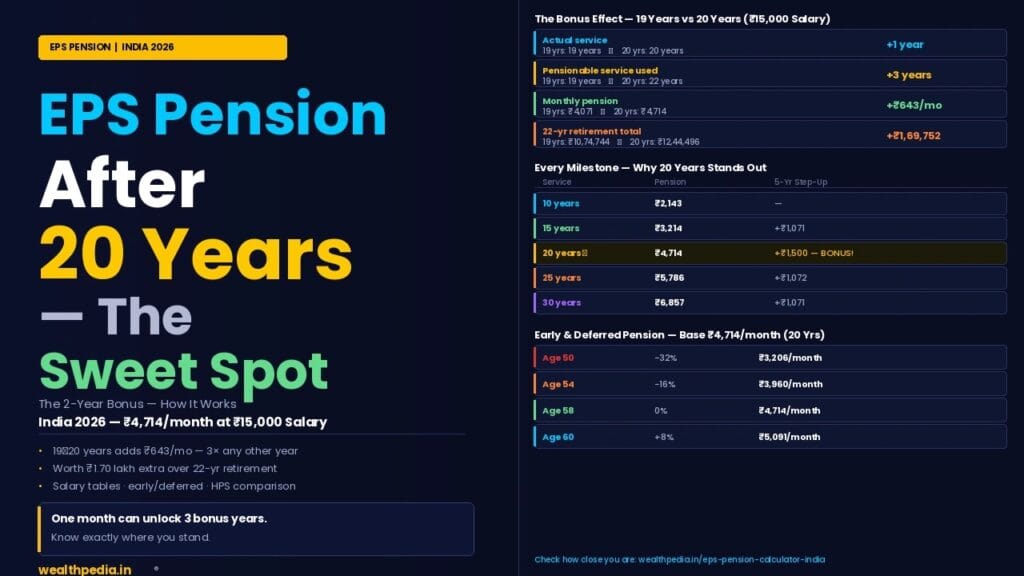
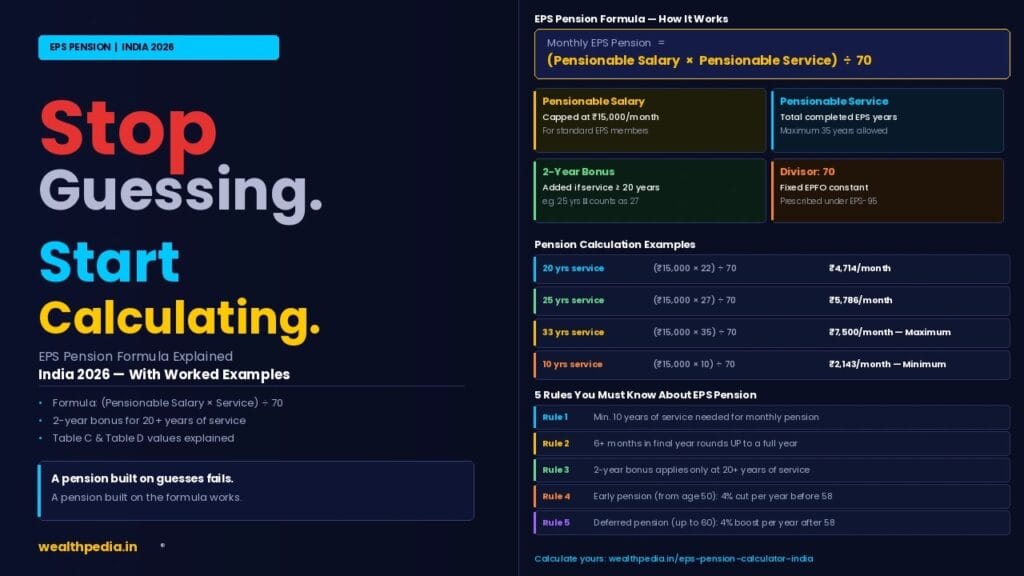
- Early monthly pension — for members aged 50–57 with 10+ years of service (pension is reduced by 4%/year before 58)
- Deferred monthly pension — for members who delay claim beyond 58 up to age 60 (pension increased by 4%/year)
- Family pension (widow/widower) — claimed by the surviving spouse after the member’s death
- Family pension (child/orphan) — claimed by dependent children after the member’s death
- Invalidity pension — claimed by members who suffer permanent total disablement while in service
Form 10D is different from Form 10C — Form 10C is for EPS withdrawal benefit or Scheme Certificate (for members with less than 10 years of service). Form 10D is exclusively for commencing monthly pension. See Form 10C Explained for the withdrawal process.
Who Should File Form 10D?
File Form 10D if you meet all of the following conditions:
- You are an EPS member (enrolled through an EPF-covered employer)
- You have completed 10 or more years of EPS-covered pensionable service
- You have attained the eligible age:
- Age 50 — for early pension (with permanent reduction)
- Age 58 — for standard pension
- Age 59 or 60 — for deferred pension (with enhancement)
- You have ceased employment at all EPF-covered establishments
Also file Form 10D if you are a family member claiming:
- Widow/widower pension after the EPS member’s death (during service or post-retirement)
- Child or orphan pension after both parents’ death
- Dependent parent pension in absence of widow/widower or children
Do NOT file Form 10D if:
- Your EPS service is less than 10 years (file Form 10C instead)
- You are still employed in an EPF-covered establishment
- You have already started receiving EPS pension (no re-filing needed)
For a complete check of your eligibility before filing, see EPS Pension Eligibility Rules.
Documents Required for Form 10D
For Aadhaar-verified online claims (most members), no physical documents need to be submitted. The following must be digitally available and linked:
Mandatory for All Claimants
- Active UAN — Universal Account Number, active and linked to Aadhaar
- Aadhaar-linked mobile number — for OTP verification during submission
- Bank account seeded with UAN — account number and IFSC must be registered on the EPFO portal
- Date of birth — must match Aadhaar records exactly; discrepancies block processing
For Member Pension (Standard / Early / Deferred)
- Retirement or exit date updated by employer in EPFO records
- Date of birth on EPFO records matching Aadhaar
For Family Pension (Widow/Widower)
- Death certificate of the deceased EPS member
- Marriage certificate (proof of spousal relationship)
- Bank account details of the widow/widower
- Nominee details as registered in EPFO (or a declaration if not registered)
For Family Pension (Children)
- Birth certificate of each child claiming pension
- Death certificate of the member (and spouse, if orphan pension)
- School/college enrollment proof if the child is above 18 and below 25
- Guardian’s bank account details if the child is a minor
For Invalidity Pension
- Medical certificate from a government-recognised medical board certifying permanent and total disablement
- Employer’s certificate confirming the disablement occurred while in service
Step-by-Step: How to File Form 10D Online (2026)
Form 10D is filed entirely online through the EPFO UAN Member Portal. There is no physical submission required for Aadhaar-verified members.
Step-by-Step: How to File Form 10D Online (2026)
Step 1 — Log In to the EPFO UAN Member Portal
Go to: unifiedportal-mem.epfindia.gov.in
Enter your UAN and password. If you have not activated your UAN, do so first using your Aadhaar and registered mobile number via the “Activate UAN” option.
Step 2 — Verify Your Profile Details
Before filing, check that the following are correctly showing under your profile:
Name (exactly as on Aadhaar)
Date of birth (matching Aadhaar)
Bank account number and IFSC seeded to your UAN
Aadhaar-linked mobile number
If any detail is incorrect, fix it before proceeding — errors in these fields cause claim rejection or delay.
Step 3 — Navigate to Online Claims
From the dashboard, go to:
Online Services → Claim (Form 31, 19, 10C & 10D)
Step 4 — Verify Bank Account
The portal displays your seeded bank account details. Enter the last 4 digits of your bank account number to confirm. Click “Verify.”
Step 5 — Select Form 10D
From the claim type dropdown, select:
“Pension (Form 10D)”
If you see multiple claim types listed, ensure you are selecting 10D (pension) and not 10C (withdrawal).
Step 6 — Enter Pension Commencement Details
The form will ask for:
Type of pension: Member pension / Family pension / Invalidity pension
Pension start age / date: If claiming early (50–57) or deferred (59–60), this affects the pension amount
Bank details confirmation: The seeded account where pension will be credited
Step 7 — Upload Supporting Documents (if required)
For family pension or invalidity pension claims, the portal prompts you to upload scanned copies of:
Death certificate (family pension)
Medical certificate (invalidity pension)
Relationship proof (family pension)
Ensure scans are clear, in PDF or JPG format, and under 1MB per file.
Step 8 — Submit with Aadhaar OTP
The portal sends a One-Time Password (OTP) to your Aadhaar-linked mobile number. Enter the OTP within the valid time window to authorise the claim submission.
For Aadhaar-verified accounts, employer approval is not required. The claim goes directly to EPFO for processing. For accounts not Aadhaar-verified, the employer must approve the claim via the EPFO Employer Portal before it is processed.
Step 9 — Note Your Claim Reference Number
After successful submission, note the claim reference number shown on screen. Use this to track your claim status on the EPFO portal under:
Online Services → Track Claim Status
How Long Does Form 10D Processing Take?
Processing timelines depend on claim type and verification status: Claim Type Typical Processing Time Member pension — Aadhaar verified 10–20 working days Member pension — employer approval needed 20–35 working days Family pension — with documents 15–30 working days Invalidity pension — with medical board cert. 20–45 working days
Once approved, the Pension Payment Order (PPO) is issued by the regional EPFO office. The PPO is a unique identifier for your pension account — note it carefully as it is needed for any future correspondence regarding your pension.
First pension credit: Typically within 3–5 working days of PPO issuance. The pension is credited to your seeded bank account on the last working day of each month.
What Is a Pension Payment Order (PPO)?
A Pension Payment Order (PPO) is a unique 12-digit number issued by EPFO when your Form 10D claim is approved. It serves as the permanent identifier for your pension account.
The PPO contains:
- Your pension account details
- Monthly pension amount sanctioned
- Pension Disbursing Authority (PDA) — the regional EPFO office handling payment
- Bank details for pension credit
Keep your PPO number safe. You will need it for:
- Raising complaints about delayed or incorrect pension credits
- Requesting a pension revision or correction
- Family pension claim after your death (your family will need it)
- Bank passbook updates showing pension credit source
Your PPO is downloadable from the EPFO Member Portal under the Pension section after the claim is approved.
Pension Commencement Date — When Does Pension Start?
A common misconception is that pension is paid retroactively from your 58th birthday or retirement date. This is incorrect.
EPS pension is paid from the date of claim (Form 10D submission date), not from the date of retirement or age eligibility. Scenario Pension Start Date Filed Form 10D on retirement at 58 From the date of Form 10D submission Retired at 55, filed Form 10D at 58 From the date of Form 10D submission at 58 Retired at 55, filed Form 10D at 52 (early pension) From the date of Form 10D submission at 52 Member died — family filed Form 10D From the date the family submitted Form 10D
Implication: Delaying your Form 10D filing means losing pension for the delay period — there are no retroactive arrears. File Form 10D as soon as you reach the eligible age (50 for early pension, 58 for standard pension) and have ceased EPF-covered employment.
The only exception is pension arrears — if EPFO takes time to process the claim after submission, any backlog from the submission date to the first credit is paid as a lump-sum arrear. See EPS Pension Arrears Explained for details.
Common Form 10D Errors and How to Fix Them
Error 1 — Name Mismatch with Aadhaar
Problem: Your name on EPFO records does not match your Aadhaar exactly (e.g., initials expanded, maiden vs married name).
Fix: Correct your name on the EPFO portal under Profile → Edit. Submit Aadhaar as proof. The employer must approve the correction. Allow 7–15 days for update.
Error 2 — Date of Birth Mismatch
Problem: DOB on EPFO records differs from Aadhaar — very common for older employees whose DOB was recorded as January 1 of the birth year.
Fix: Submit a DOB correction request with Aadhaar and any supporting document (school certificate, passport) through the EPFO portal. Employer approval required. This can take 15–30 days.
Error 3 — Bank Account Not Seeded
Problem: No bank account is linked to your UAN — pension cannot be credited.
Fix: Log in to the EPFO portal → KYC section → Add bank account with IFSC. Aadhaar-linked accounts are approved instantly; others require employer approval.
Error 4 — Employer Has Not Updated Exit Date
Problem: Your employer has not marked your date of leaving in the EPFO Employer Portal — EPFO cannot confirm you have ceased employment.
Fix: Contact your HR/payroll team and ask them to update your exit date on the EPFO portal immediately. If the employer is unresponsive, raise a grievance via EPFiGMS at epfigms.gov.in.
Error 5 — EPS Service Below 10 Years
Problem: EPFO rejects the Form 10D claim because cumulative EPS service is under 10 years.
Fix: Check your EPFO passbook for service gaps. If old service from previous employers was not transferred, submit Scheme Certificates from those employers. If gaps are due to missing contributions, raise a complaint against the employer via EPFiGMS.
Error 6 — Multiple UANs Exist
Problem: You have UANs from different employers that are not merged — service is split across multiple UANs, showing under 10 years each.
Fix: Get UANs merged via the EPFO Member Portal (raise a UAN merge request). Only one UAN should exist per member — all others must be deactivated after merging.
Error 7 — Mobile Number Not Linked to Aadhaar
Problem: Your registered mobile on EPFO portal is not the same as your Aadhaar-linked mobile — OTP cannot be verified.
Fix: Update your mobile number on the EPFO portal. Alternatively, use the UIDAI portal (uidai.gov.in) to update the mobile linked to your Aadhaar.
How to Track Your Form 10D Claim Status
After submitting Form 10D, track the claim status at:
EPFO UAN Portal → Online Services → Track Claim Status
Status stages you may see: Status Meaning Claim Submitted EPFO has received the claim — pending processing Under Process EPFO is verifying service records and details Claim Settled PPO issued — pension will start crediting Claim Rejected Form 10D rejected — reason shown; re-file after fixing Pending at Employer Employer approval awaited (for non-Aadhaar verified)
If your claim is rejected, the portal shows the rejection reason. Fix the issue and re-submit. There is no penalty for re-filing after a rejection.
Form 10D for Family Pension — Special Considerations
When a family member files Form 10D for widow, child, or orphan pension after the EPS member’s death, the process has additional steps:
For Widow/Widower Pension
- File Form 10D in the widow’s name (not the deceased member’s name)
- Attach death certificate and marriage certificate as scanned uploads
- Pension is credited to the widow’s bank account — it must be in her/his own name
- Widow pension continues for life or until remarriage
- On remarriage, widow pension ceases — the widow must inform EPFO
For Child/Orphan Pension
- File Form 10D for each eligible child separately (up to 2)
- For minor children, the guardian files on their behalf
- Pension is credited to the guardian’s account until the child reaches 18, then transferred to the child’s own account
- The pension stops when the child turns 25 (except for permanently disabled children)
Death Certificate Requirement
The original death certificate must be submitted to the regional EPFO office (physical submission) for family pension claims, in addition to the online filing. EPFO offices accept attested photocopies in most cases — confirm with your regional office.
Form 10D vs Form 10C — Quick Comparison
Feature Form 10D Form 10C Purpose Claim monthly EPS pension EPS withdrawal benefit or Scheme Certificate Applicable when 10+ years service, eligible age Under 10 years service Benefit type Monthly pension for life Lump sum (Table D) or service certificate Filed by Member or family Member Minimum age 50 (early), 58 (standard) No minimum age Processing time 10–45 days 7–20 days
For the complete Form 10C guide, see Form 10C Explained: EPS Withdrawal & Scheme Certificate.
After Form 10D — What Happens Next?
Once your Form 10D is processed and PPO is issued:
- First pension credit arrives within 3–5 working days of PPO issuance
- Monthly pension is credited on the last working day of each month
- Annual Pension Slip is issued by EPFO — download from the portal each April
- Jeevan Pramaan (Life Certificate) must be submitted once a year (typically in November) to continue pension — this is a biometric verification confirming you are alive. Submit at any EPFO office, Common Service Centre, or via the Jeevan Pramaan app on a smartphone with fingerprint capability
- Bank account changes — if you switch banks, update the new account on the EPFO portal and inform your regional EPFO office with a new bank passbook copy
Jeevan Pramaan — Annual Life Certificate for EPS Pensioners
All EPS pensioners must submit a Jeevan Pramaan (Life Certificate) every year to continue receiving pension uninterrupted.
- When: Typically in November each year (EPFO may adjust the window)
- How: Via biometric authentication at an EPFO office, bank, Common Service Centre, or using the Jeevan Pramaan mobile app with Aadhaar-linked fingerprint
- What happens if missed: Pension is suspended until the Life Certificate is submitted. All arrears during the suspension period are credited as a lump sum once the certificate is submitted
For senior pensioners who cannot visit an office, doorstep Jeevan Pramaan services are available in some cities — check with your regional EPFO office.
EPS Pension Amount — Compute Before Filing
Before filing Form 10D, it is strongly recommended to calculate your expected monthly pension so you can verify that EPFO’s sanctioned amount matches your calculation. Use the EPS Pension Calculator India which applies all EPFO rules including:
- Pensionable salary cap at ₹15,000
- Pensionable service with partial-year rounding
- 2-year bonus for 20+ years of service
- Early pension reduction at your claim age
- Deferred pension enhancement if claiming after 58
- Table C pension amounts
If the pension sanctioned by EPFO differs significantly from your calculation, raise a complaint via EPFiGMS with a detailed working of your expected amount.
Frequently Asked Questions — Form 10D
What is Form 10D in EPF/EPS?
Form 10D is the official EPFO application form to commence monthly EPS pension. It is filed by EPS members who have completed 10+ years of service and reached the eligible age (50 for early pension, 58 for standard pension), as well as by family members claiming survivor pension. It is entirely online through the EPFO UAN Member Portal.
How do I fill Form 10D online?
Log in to unifiedportal-mem.epfindia.gov.in with your UAN → Online Services → Claim (Form 31, 19, 10C & 10D) → Select “Pension (Form 10D)” → Verify bank account → Enter pension type and start date → Upload documents if required → Submit with Aadhaar OTP. Full step-by-step guide is in the article above.
What documents are required for Form 10D?
For member pension claims: active UAN, Aadhaar-linked mobile for OTP, bank account seeded with UAN, and employer-updated exit date. For family pension: death certificate, marriage/birth certificate, and claimant’s bank account. For invalidity pension: medical board certificate.
How long does Form 10D take to process?
Standard member pension claims take 10–20 working days for Aadhaar-verified accounts. Family pension claims with document verification take 15–30 days. Invalidity pension may take 20–45 days. Once approved, the Pension Payment Order (PPO) is issued and first pension credits within 3–5 working days.
What is a PPO number in EPS pension?
PPO (Pension Payment Order) is a unique 12-digit reference number issued by EPFO when your Form 10D is approved. It identifies your pension account permanently. Use it for all future correspondence with EPFO about your pension. Download it from the EPFO portal after approval.
Can I file Form 10D before turning 58?
Yes — if you are claiming early pension (from age 50). The pension will be permanently reduced by 4% for each year before 58. File Form 10D as soon as you reach age 50 and have the required 10+ years of service and have ceased EPF-covered employment. See EPS Early Pension Before 58.
Is employer approval required for Form 10D?
For Aadhaar-verified UAN accounts, employer approval is not required — the claim goes directly to EPFO. For accounts not Aadhaar-verified, the employer must approve the claim via the EPFO Employer Portal. Aadhaar verification is strongly recommended before filing to avoid delays.
What happens if Form 10D is rejected?
The rejection reason is displayed in the claim tracking portal. Common reasons include name mismatch, DOB discrepancy, bank account not seeded, or employer exit date not updated. Fix the specific issue and re-submit Form 10D. There is no penalty for re-filing.
Can I get arrears if I file Form 10D late?
Pension starts from the date of Form 10D submission, not from your retirement or age eligibility date. If you delay filing, you lose pension for the delay period — there are no retroactive arrears for time before submission. However, if EPFO processing takes time, arrears from the submission date to first credit are paid as a lump sum.
What is Jeevan Pramaan and why is it required?
Jeevan Pramaan is an annual digital Life Certificate that all EPS pensioners must submit to confirm they are alive and eligible to continue receiving pension. It is submitted via biometric authentication at EPFO offices, banks, Common Service Centres, or the Jeevan Pramaan mobile app. Missing the annual submission suspends pension until the certificate is received.
My employer has shut down — how do I file Form 10D?
If your employer has closed and cannot update your exit date on EPFO records, raise a grievance via EPFiGMS at epfigms.gov.in with supporting documents (resignation letter, last salary slip, bank statements showing last salary). EPFO can administratively update the exit date. Once updated, file Form 10D normally online.
Can my wife file Form 10D on my behalf if I am unwell?
For member pension claims, the member must file personally (as Aadhaar OTP verification is required). For physically incapacitated members, visit the regional EPFO office with an authorisation letter and the member’s identification — they can process the claim manually. For family pension after the member’s death, the spouse files in their own name.
What pension amount will I receive — how do I know before filing?
Use the EPS Pension Calculator India before filing Form 10D. Enter your service dates, pensionable salary, and desired claim age — it gives your expected monthly pension using the EPFO formula. If the EPFO-sanctioned amount differs significantly, raise a complaint.
Can I change my bank account after Form 10D is filed?
Yes. Update the new bank account on the EPFO UAN portal (KYC section) and inform your regional EPFO office in writing with a cancelled cheque or bank passbook copy. Pension will be credited to the new account from the next cycle after the update is processed.
Does EPS pension continue after I die?
Yes — your spouse receives widow pension at 50% of your pension (minimum ₹1,000/month), and children receive 25% each (up to 2, up to age 25). The family files Form 10D in their own name with the death certificate and relationship proof. Full details in EPS Family Pension Rules.
What if my pension amount sanctioned by EPFO is wrong?
Compare the EPFO-sanctioned amount with your calculation using the EPS Pension Calculator India. If there is a discrepancy, raise a written complaint via EPFiGMS with your service records, pensionable salary history, and expected pension calculation. EPFO must review and revise if the error is confirmed.
Can I claim EPS pension and EPF corpus at the same time?
Yes. File Form 10D for EPS pension and Form 19 for EPF corpus withdrawal simultaneously — they are independent claims from separate funds. Both can be filed online at the same time from the EPFO UAN portal.
What is the difference between Form 10D and Form 10C?
Form 10D is for commencing monthly EPS pension (10+ years of service, eligible age reached). Form 10C is for EPS withdrawal benefit (lump sum via Table D) or Scheme Certificate (for members with less than 10 years of service). They serve completely different purposes. See Form 10C Explained.
Is Form 10D available offline?
EPFO encourages online filing for all members with Aadhaar-linked UAN. Physical Form 10D submission at EPFO offices is available for members who cannot file online (no Aadhaar linkage, technical issues, or family pension claimants requiring physical documents). Download the physical form from epfindia.gov.in if needed.
What happens to EPS pension if the pensioner remarries?
For the member’s own pension, remarriage has no effect — it continues uninterrupted. For widow pension — if the surviving spouse remarries, the widow pension ceases. The widow must inform EPFO immediately. Child pension for eligible children continues even if the widow remarries, until the children reach age 25.
How many times can I file Form 10D?
Form 10D is typically filed once — when commencing pension. Once the PPO is issued, monthly pension continues automatically without re-filing. Family members file their own Form 10D separately after the member’s death. There is no annual re-filing requirement — only the annual Jeevan Pramaan (Life Certificate) is needed.
Can I suspend my EPS pension if I rejoin employment?
If you rejoin an EPF-covered establishment after starting pension, you must stop drawing EPS pension for the re-employment period. Inform EPFO and the new employer. On final retirement from re-employment, file a revised Form 10D to resume and recalculate pension including the additional service.
What if I never filed Form 10D and am now 70 years old?
You can still file Form 10D — there is no upper age limit or expiry for pension claims. However, pension only starts from the date of Form 10D submission — you cannot claim retroactive pension for all the years you did not file. File immediately to start receiving monthly pension going forward.
Is there a penalty for not submitting Jeevan Pramaan on time?
There is no financial penalty — but pension is suspended until the Life Certificate is received. All pension amounts for the suspended period are credited as arrears once the certificate is submitted. Regular submission in November each year prevents any interruption.
Where can I check my EPS pension status after Form 10D is filed?
Track your Form 10D claim at the EPFO UAN portal: Online Services → Track Claim Status. After approval, view your PPO and pension details in the Pension section of the portal. For pension credit confirmation, check your seeded bank account on the last working day of each month.
Disclaimer: The information on this page is for educational purposes only and does not constitute investment or financial advice. EPS rules and Form 10D procedures are governed by EPFO regulations and may be updated by the Government of India. For personalised guidance, consult a SEBI-registered financial planner or visit your nearest EPFO office. Wealthpedia™ (Trademark Reg. No. 4910385) is not a SEBI-registered investment advisor. All mutual fund references on this site are for Direct Plan, Growth option only.

Vishal Jhaveri is the founder of Wealthpedia and an MBA Finance professional with over 10 years of experience in financial planning, investing, and wealth creation. He specializes in FIRE (Financial Independence, Retire Early), retirement planning, investing, and personal finance education. Through Wealthpedia, he develops financial calculators and publishes evidence-based content to help Indian investors make informed financial decisions. He regularly reviews and updates Wealthpedia articles to reflect changes in tax, laws, investment regulations, and personal finance best practices.
Quick Wrap up